

On this page
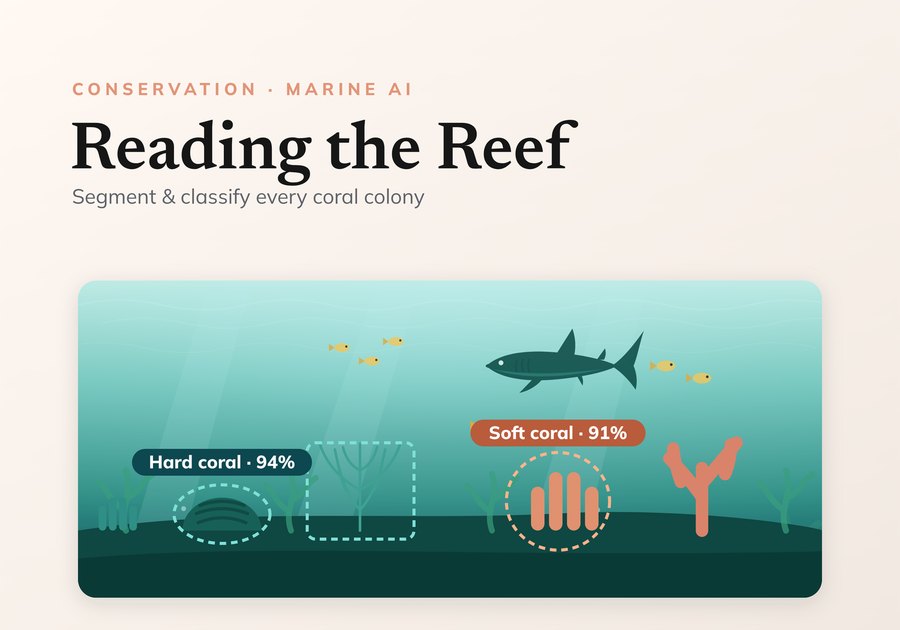
In this post we explore the development of a benthic coral reef analyzer, built in partnership with ReefSupport to improve the tools for monitoring coral reefs and marine environments.
For the full picture, here is the coral analysis pipeline. Tap through for the project:
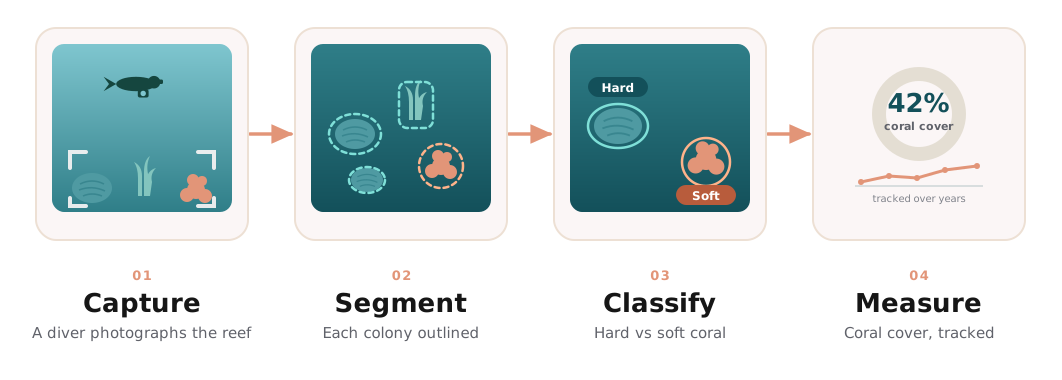 Capture → segment → classify → measure coral cover over time
Leveraging computer vision for the segmentation of coral reefs in benthic imagery holds the potential to quantify the long-term growth or decline of coral cover within marine protected areas
Project Scope
Our collaboration develops an underwater benthic imagery model that identifies and locates the functional groups in a reef, flexible enough to use across marine regions worldwide.
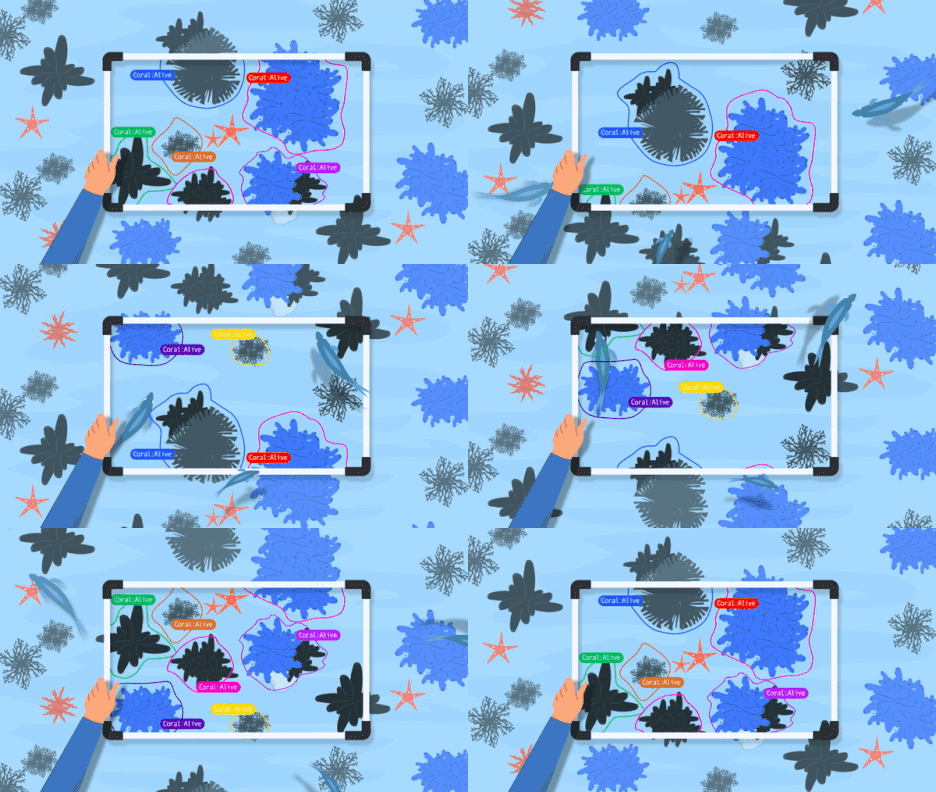 The benthic imagery analysis system by Reef Support
We start by distinguishing hard from soft coral, then add finer taxonomic detail as the system matures, a broad foundation to build comprehensive reef analysis on.
Provided Datasets
The data provided by ReefSupport is made available on a publicly hosted Google Cloud bucket. It comes in two forms:
Point (sparse) labels
Random points in an image are classified, typically 50–100 per image. Sources: IBF, Reefolution, and Seaview.
Mask (dense) labels
Full segmentation masks for hard and soft corals. Sources: CoralSeg, plus ReefSupport's own carefully annotated subsets covering reefs worldwide.
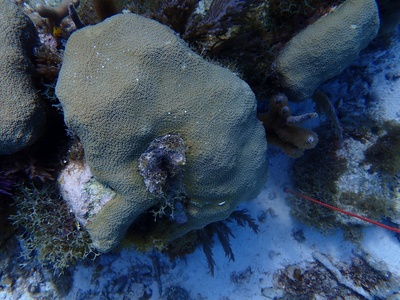
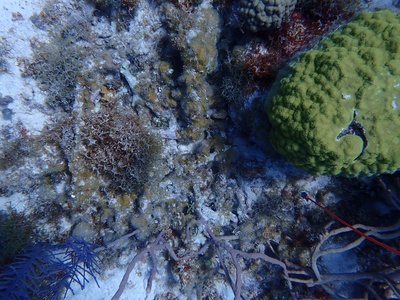
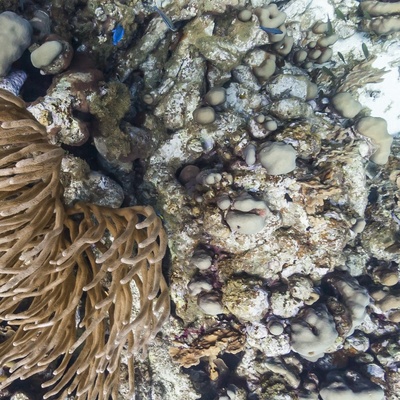
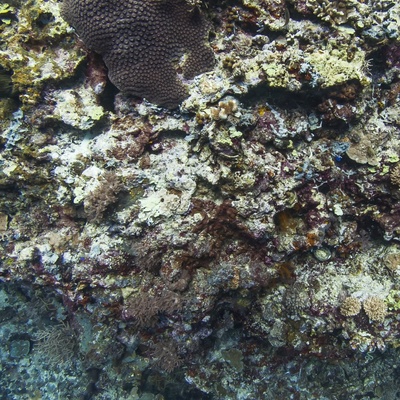
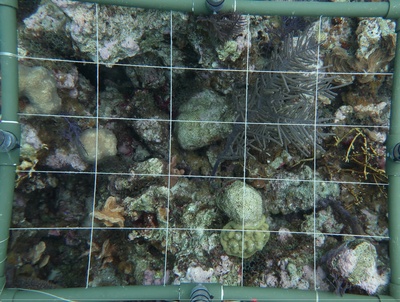
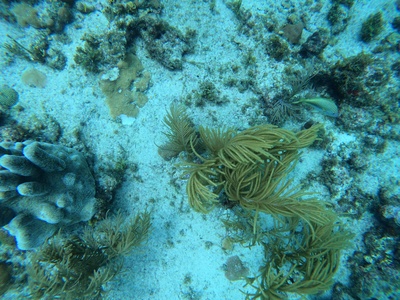
Each image is associated with a dense stitched mask made of all the individual coral instances.
 Associated labels from the ReefSupport dataset - hard and soft coral instances masks
Exploratory Data Analysis
Before modelling, we explored the dataset closely, and it surfaced several data-quality issues worth fixing first.
Data quality issues
Empty masks
Some stitched masks were entirely black: 532 in SEAVIEW_PAC_USA and 328 in SEAVIEW_ATL. Removing these empty masks gave a cleaner dataset and improved performance during training and evaluation.
 Empty Masks samples
Low quality labels
The dense labels in SEAVIEW/PAC_USA covered almost all the coral in an image as one big mask rather than outlining each individual, so we excluded them from the training set.
 Low quality Masks samples
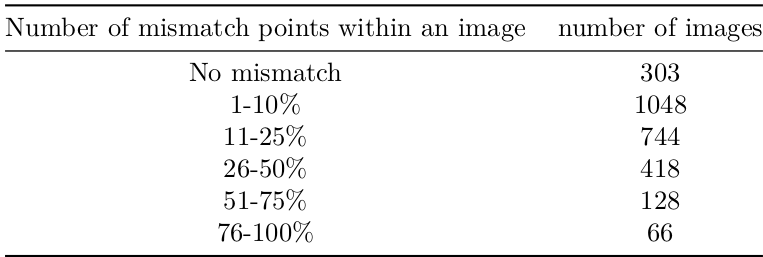
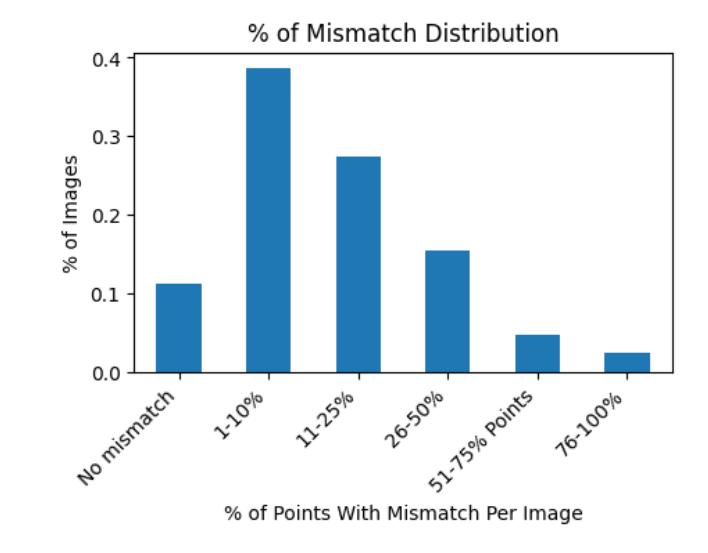
Mismatched sparse and dense labels
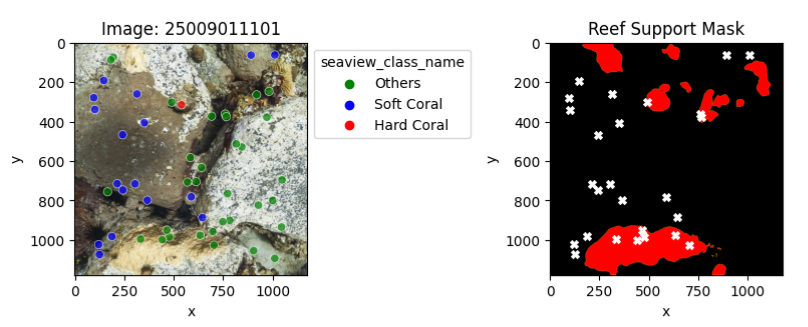
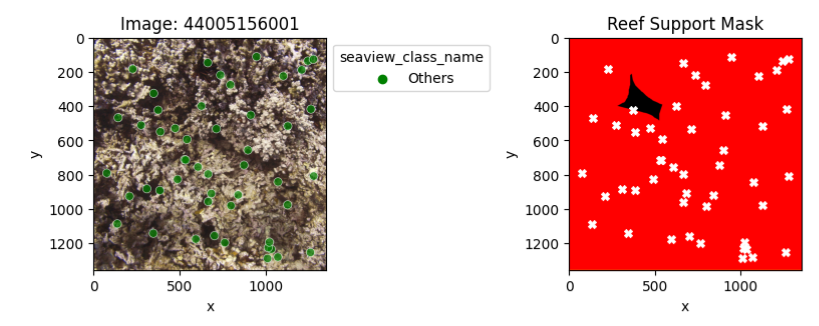
We compared ReefSupport’s dense (mask) labels against the sparse (point) labels for the same images.
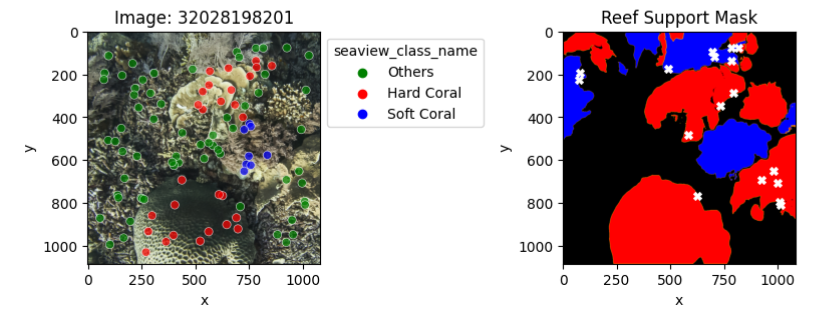
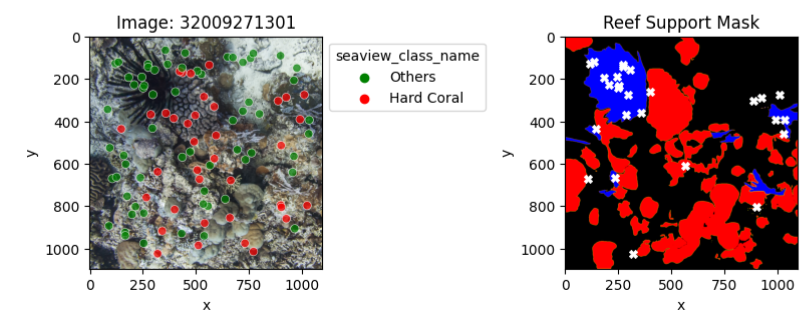
The presented samples illustrate instances where point labels contradict dense labels. Each white cross signifies a label mismatch, with the first sample showing a 17% error mismatch and the last sample demonstrating a complete 100% error mismatch.
Data leakage
In one region, many images overlap with their neighbours within the same quadrats. If overlapping images land in different splits, the model effectively sees test content during training, inflating its scores. Ordering by image ID makes it clear: most images share content with their neighbours.
 A sequence of 4 photos that share overlaps with their neighbours
 Another sequence of 4 photos that share overlaps with their neighbours
Since it is confined to one region, we gauge its impact by evaluating the model region by region.
Class imbalance
The dataset skews heavily towards hard coral, with roughly five times more instances than soft coral. Such imbalance biases a model towards the majority class and hurts its performance on the minority one.
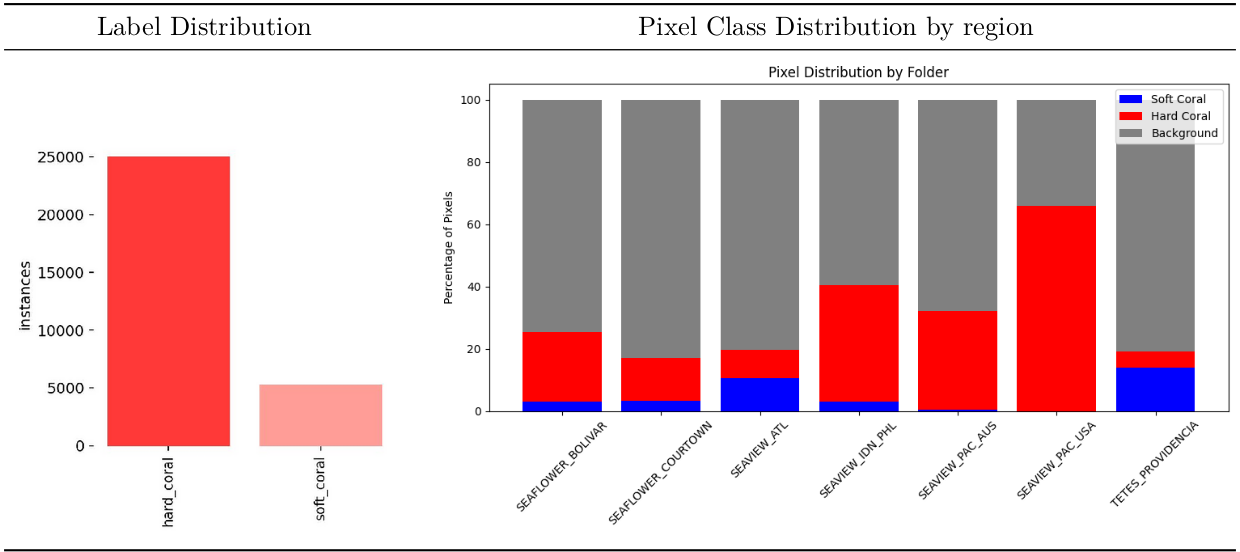 Class imbalance distributions
Data Preparation
YOLOv8 TXT format
To use the YOLOv8 ecosystem, we first convert the raw datasets into its expected format.
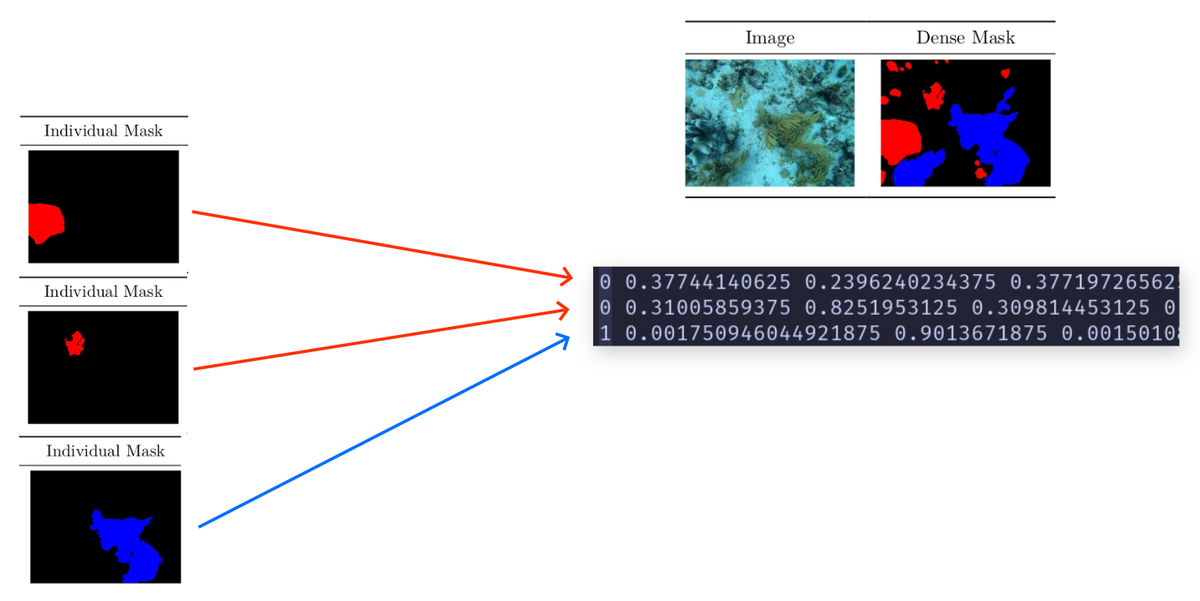 YOLOv8 TXT format conversion
Each line represents an instance of a class with a defined contour. It has the following format:
class_number x1 y1 x2 y2 x3 y3 ... xk yk
class_number x1 y1 x2 y2 x3 y3 ... xj yj
Where the coordinates x and y are normalized to the image width and height accordingly. Therefore, they always lie in the range [0,1].
Example:
1 0.617 0.359 0.114 0.173 0.322 0.654
0 0.094 0.386 0.156 0.236 0.875 0.134
Therefore, each line corresponds to an individual mask instance.
The OpenCV library is employed to convert the dense individual masks into contour coordinates.
Data Modeling
Data Split
In this section, we elucidate the methodology employed for the train/val/test splits across different datasets.
For each region, a dedicated dataset is created with an 80/10/10 split ratio
for train/val/test. Simultaneously, a comprehensive global dataset is
established using the same split ratios. Importantly, any image allocated to
the test set for a region-specific dataset is also included in the test set for
the global dataset (similarly for train and val splits). This design
facilitates the evaluation of models trained on region-specific datasets
against the global dataset.
| Dataset | Region | splits ratio | train | val | test | total |
|---|---|---|---|---|---|---|
| ALL | ALL | 80/10/10 | 1392 | 173 | 177 | 1742 |
| SEAFLOWER | BOLIVAR | 80/10/10 | 196 | 24 | 25 | 245 |
| SEAFLOWER | COURTOWN | 80/10/10 | 192 | 24 | 25 | 241 |
| SEAVIEW | ATL | 80/10/10 | 264 | 33 | 33 | 330 |
| SEAVIEW | IDN_PHL | 80/10/10 | 189 | 24 | 24 | 237 |
| SEAVIEW | PAC_AUS | 80/10/10 | 467 | 58 | 59 | 584 |
| TETES | PROVIDENCIA | 80/10/10 | 84 | 10 | 11 | 105 |
Instance Segmentation vs Semantic Segmentation
Semantic segmentation assigns a class label to each pixel in an image, such as ‘person,’ ‘dog,’ or ‘flower,’ grouping together pixels of the same class. Conversely, instance segmentation distinguishes between individual instances of objects within the same class, treating each one as a separate entity.
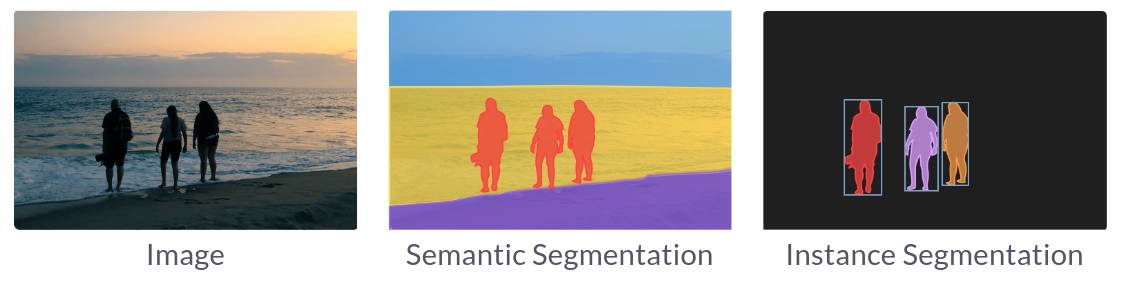 Semantic segmentation vs Instance segmentation
For analyzing benthic coral reefs, an instance segmentation approach proves superior as it enables precise localization and counting of reef organisms.
Evaluation Metrics
We evaluate segmentation with mean IoU (mIoU) and the Dice coefficient, avoiding mean pixel accuracy since it’s misleading on skewed datasets.
mIoU (Jaccard index) measures the overlap between the predicted and ground-truth masks (higher is better):
$$\mathit{IoU} = \dfrac{A \cap B}{A \cup B}$$Dice coefficient (F1) also rewards overlap but weights true positives more heavily, which makes it well-suited to imbalanced data:
$$\mathit{DiceCoefficient} = \dfrac{2 \times TP}{2 \times TP + FP + FN}$$YOLOv8
Overview
We took a pretrained YOLOv8 model and fine-tuned it for our instance segmentation task. YOLOv8 is fast, accurate, and easy to work with, and it handles a range of tasks: object detection, tracking, instance segmentation, image classification, and pose estimation.
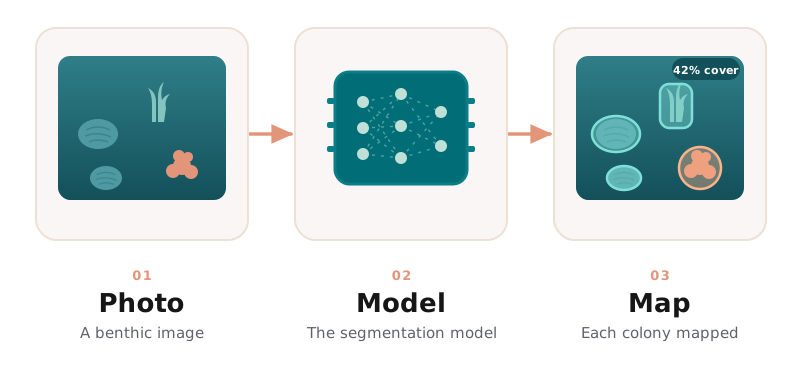 Segmentation on a benthic image: a photo in, each colony mapped out
Training
Baseline
We first established a baseline to gauge the approach: a medium-size pretrained model fine-tuned for 5 epochs on the train split.
| mIoU | IoU_hard | IoU_soft | IoU_other | mDice | Dice_hard | Dice_soft | Dice_other |
|---|---|---|---|---|---|---|---|
| 0.70 | 0.64 | 0.58 | 0.89 | 0.82 | 0.78 | 0.73 | 0.94 |
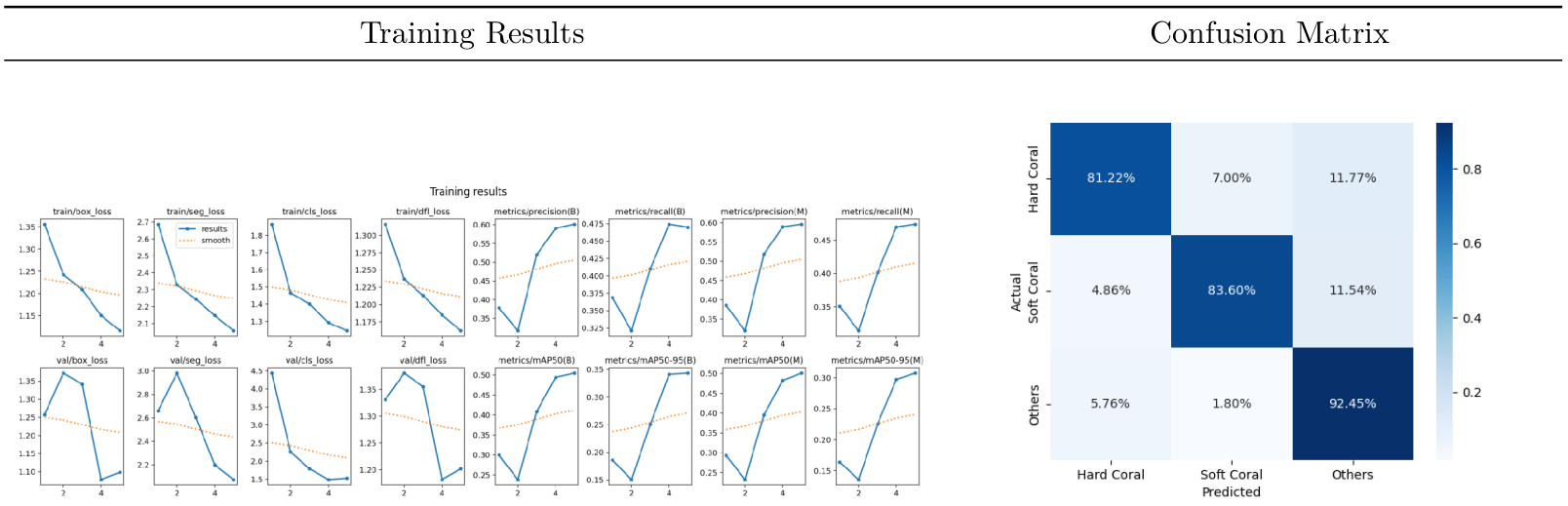 Results / Quantitative - Training metrics (left) and pixel level confusion matrix (right)
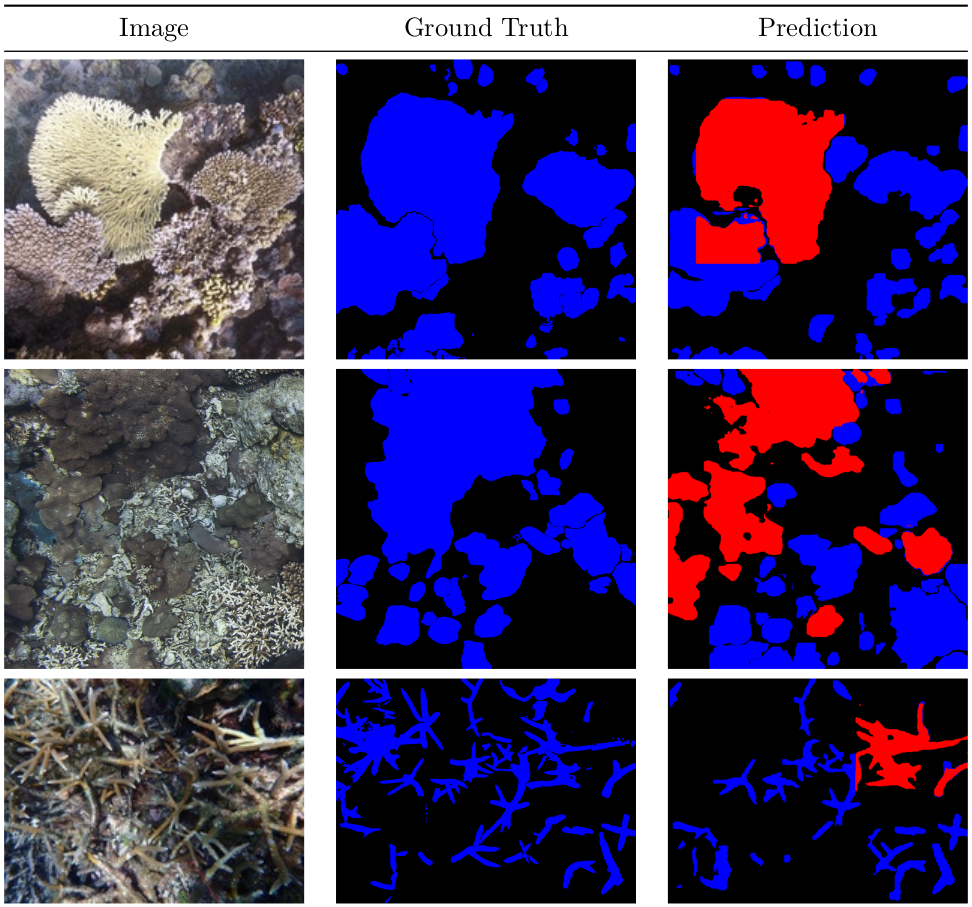 Results / Qualitative
The initial results are highly promising, prompting us to further optimize the performance of the modeling approach through meticulous selection of hyperparameters.
Best Model
After hundreds of GPU-hours of hyperparameter search, we arrived at the best-performing models.
Given the uncertainty about ReefSupport’s hardware configurations and the intended use of the models (including the possibility of running on live video streams from underwater cameras), we aimed to offer a diverse range of models. These span from models suitable for embedding on edge devices, enabling real-time video stream segmentation, to high-end GPUs delivering peak performance. This approach ensures flexibility to accommodate various deployment scenarios.
The pre-trained YOLOv8 models undergo fine-tuning for 140 epochs with images resized to 1024x1024 pixels. Additionally, random flipping and rotation of images up to 45 degrees are applied during training.
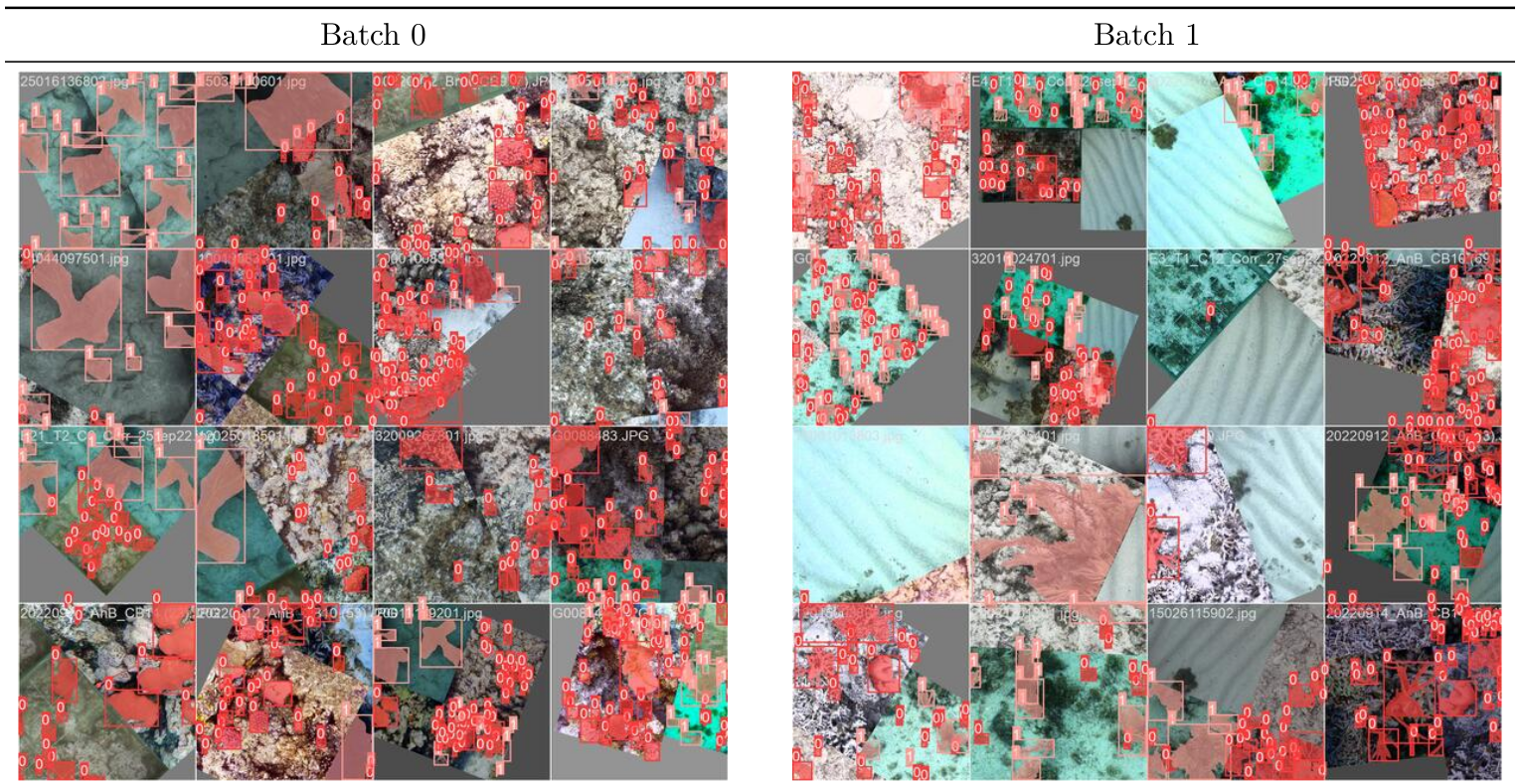 Data Augmentation / Batch Samples
| mIoU | IoU_hard | IoU_soft | IoU_other | mDice | Dice_hard | Dice_soft | Dice_other |
|---|---|---|---|---|---|---|---|
| 0.85 | 0.80 | 0.81 | 0.94 | 0.92 | 0.89 | 0.90 | 0.97 |
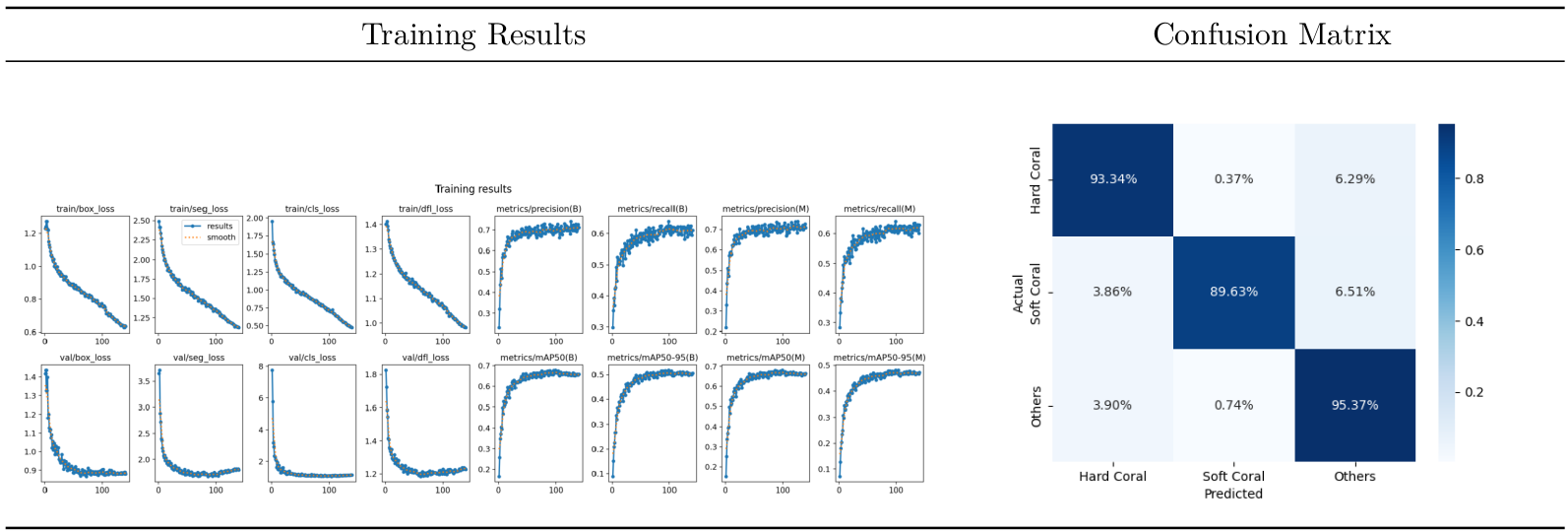 Results / Quantitative - Training metrics (left) and pixel level confusion matrix (right)
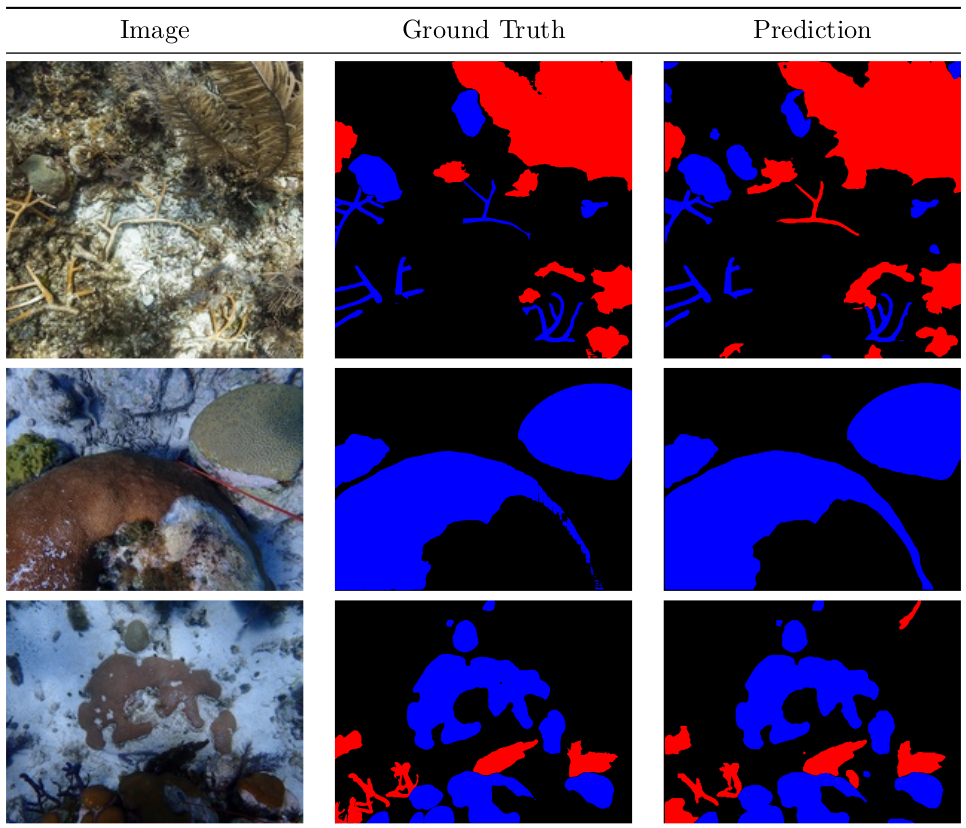 Results / Qualitative
Evaluation
The subsequent table provides a summary of the performance of the best model on the test sets for each region:
| data | mIoU | IoU_hard | IoU_soft | IoU_other | mDice | Dice_hard | Dice_soft | Dice_other |
|---|---|---|---|---|---|---|---|---|
| all | 0.85 | 0.80 | 0.81 | 0.94 | 0.92 | 0.89 | 0.90 | 0.97 |
| sf_bol | 0.80 | 0.85 | 0.63 | 0.93 | 0.89 | 0.92 | 0.77 | 0.97 |
| sf_crt | 0.72 | 0.70 | 0.54 | 0.94 | 0.83 | 0.82 | 0.70 | 0.97 |
| sv_atl | 0.78 | 0.63 | 0.78 | 0.92 | 0.87 | 0.78 | 0.87 | 0.96 |
| sv_phl | 0.62 | 0.75 | 0.21 | 0.91 | 0.72 | 0.86 | 0.34 | 0.95 |
| sv_aus | 0.69 | 0.76 | 0.38 | 0.92 | 0.79 | 0.86 | 0.55 | 0.96 |
| tt_pro | 0.87 | 0.77 | 0.88 | 0.96 | 0.93 | 0.87 | 0.94 | 0.98 |
As the various evaluation metrics are weighted in proportion to the number of pixels per region, we provide a summary below, illustrating the different weights assigned to regions based on their respective pixel counts:
| data | # images (test) | # pixels | weight (%) | mIoU | IoU_hard | IoU_soft | IoU_other |
|---|---|---|---|---|---|---|---|
| sf_bol | 25 | 7056000000 | 39.2 | 0.80 | 0.85 | 0.63 | 0.93 |
| sf_crt | 25 | 1912699566 | 10.6 | 0.72 | 0.70 | 0.54 | 0.94 |
| sv_atl | 33 | 1136559093 | 6.3 | 0.78 | 0.63 | 0.78 | 0.92 |
| sv_phl | 24 | 866520651 | 4.8 | 0.62 | 0.75 | 0.21 | 0.91 |
| sv_aus | 59 | 1944497328 | 10.8 | 0.69 | 0.76 | 0.38 | 0.92 |
| tt_pro | 11 | 5079158784 | 28.2 | 0.87 | 0.77 | 0.88 | 0.96 |
Model size vs Model accuracy
The table below summarizes the performance of the different YOLOv8 models that are trained on the same training set, using the same test set for evaluation.
| model size | mIoU | IoU_hard | IoU_soft | IoU_other | mDice | Dice_hard | Dice_soft | Dice_other |
|---|---|---|---|---|---|---|---|---|
| x | 0.85 | 0.79 | 0.81 | 0.94 | 0.92 | 0.88 | 0.90 | 0.97 |
| l | 0.85 | 0.80 | 0.81 | 0.94 | 0.92 | 0.89 | 0.90 | 0.97 |
| m | 0.85 | 0.80 | 0.80 | 0.94 | 0.92 | 0.89 | 0.89 | 0.97 |
| s | 0.84 | 0.78 | 0.80 | 0.93 | 0.91 | 0.88 | 0.89 | 0.98 |
| n | 0.83 | 0.77 | 0.80 | 0.93 | 0.91 | 0.87 | 0.89 | 0.97 |
The top-performing model is the l size model, as indicated in the table
above. As the model size decreases, there is a slight degradation in
performance, from a mIoU of 0.85 to 0.83. However, the advantage of smaller
models lies in their faster execution and compatibility with smaller hardware
devices.
Conclusion
YOLOv8 proved a strong fit for this instance-segmentation task, accurate even on modest hardware, and fast enough to run on live underwater video streams, which makes it practical for real deployments.
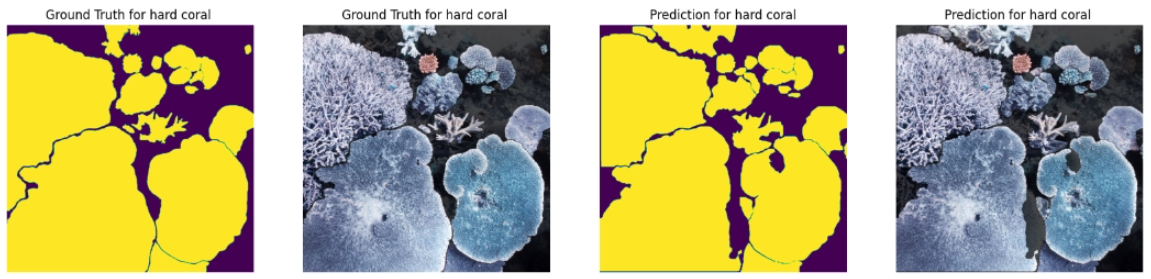 Benthic Segmentation / Hard Coral
In conclusion, while YOLOv8 presents a robust solution for the instance segmentation task, it is crucial to carefully address issues related to regional model performance, data leakage, and dataset quality. The insights gained from our findings are invaluable for refining and optimizing computer vision applications in marine biology and underwater image segmentation.
You can try the segmenter yourself on real benthic imagery; the interactive demo runs right in your browser.
Try the interactive demo
See the model in action right in your browser. Try it on the built-in examples or your own data. No install, no setup.
Open the demo